Restrictions in Views
A restriction provides limitation on the data to which the entire dataset is connected to. The main purpose of restrictions is to exclude a portion of data from being viewed, accessed and analyzed in dashlets. Users may need to exclude some data for the below reasons:
- The need to exclude dirty data (some data that is incomplete, outdated, duplicate, inaccurate, etc.),
- To eliminate outliers,
- To prevent other users from viewing and accessing certain data for privacy issues.
Restricting Data in Nodes
How to restrict data in nodes?
1 In “Restrictions” tab, select the node/field that you wish to restrict its data from the left-side menu.
2 Determine the values you want to restrict in “Restricted Values” field.
3 You may select the data you want to be visible one by one, or alternatively, you may select the data you want to exclude from your view by selecting the “Reverse” option from the right-corner ellipsis menu.
4 If you decide to restrict some data while working on a dashlet, TURBOARD gives you the option to directly open the “Edit” window for the related view of that dashlet through Edit data view icon.
Note
As you are using restrictions on data views and data tables, this means that any restriction(s) you make will take effect on any dashlet where that view is used. Think of restrictions as a macro criterion that will always be added to the end of each query that is executed on that view.
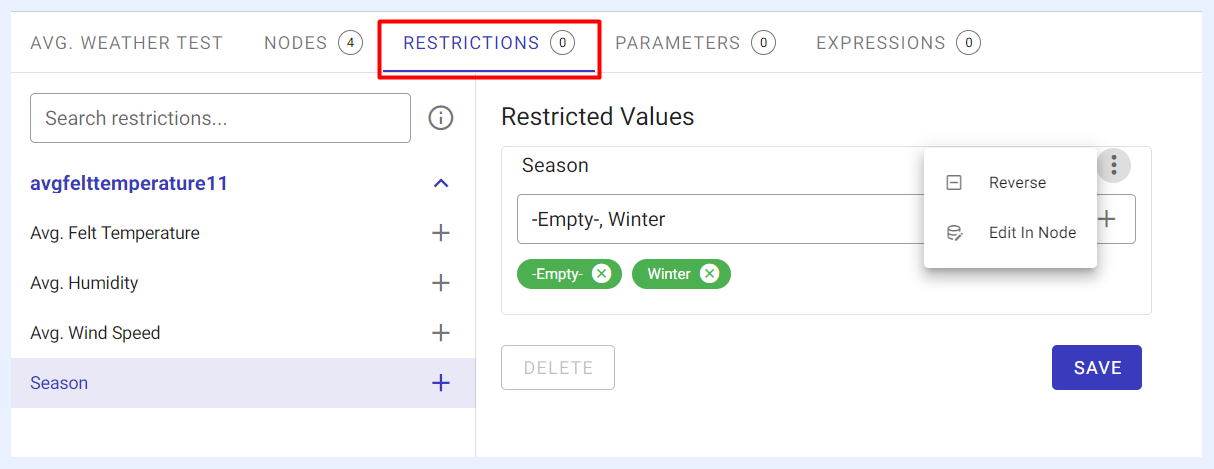
Nodes Restrictions