Introduction to Forms
What is FOR-S Companion Module?
TURBOARD's FOR-S Companion Module, often referred to as “TURBOARD Forms”, is an integral tool designed for data collection. As an extension to TURBOARD's main offerings, which encompass advanced dashboards, detailed analysis, and integration capabilities with varied data sources, the FOR-S Companion Module serves as a connection between efficient data collection and in-depth business analysis.
Organizations frequently encounter challenges in collecting relevant data. They often grapple with an over-reliance on external sources or navigate complex manual data collection processes. Whether you operate within sectors like healthcare, education, manufacturing, or local governance, the FOR-S Companion Module provides a solution. TURBOARD developed the FOR-S Companion Module to help organizations capture, customize, and effortlessly integrate their data into the broader TURBOARD analytical framework, all within the same platform.
Why FOR-S Companion Module?
The FOR-S Companion Module was developed by TURBOARD to address the pivotal challenges organizations face in data collection, ensuring both efficiency and adaptability across diverse sectors. It enables businesses to:
- Craft and adapt any form to match specific data collection needs, including modifying and customizing the various settings of fields’ input.
- Integrate collected data into TURBOARD's analytical tools for immediate analysis.
- Use different methods for collecting data, such as post-validation, allowing repeated form submissions, and employing other custom methods.
- Schedule future publish dates for forms and determine their expiry dates, ensuring timely availability and relevance.
- Convert and save collected data directly into Excel files for further processing or sharing.
- Automate notifications, alerting users when necessary through SMS and/or email.
- Maintain the highest level of confidentiality and integrity, as all data is securely housed within the TURBOARD ecosystem.
- Access and complete forms on the go using mobile devices due to the module’s mobile compatibility.
- Employ FOR-S data collection features across a spectrum of business scenarios, catering to the unique requirements of various sectors and industries.
User Roles and Integrated Workflow
Thanks to its mobile compatibility and automatic notification system, the FOR-S Companion Module offers a clear and straightforward workflow. With specific roles for Admins, Respondents, and Confirmers and their respective permissions, the module ensures a smooth process from data collection to analysis.
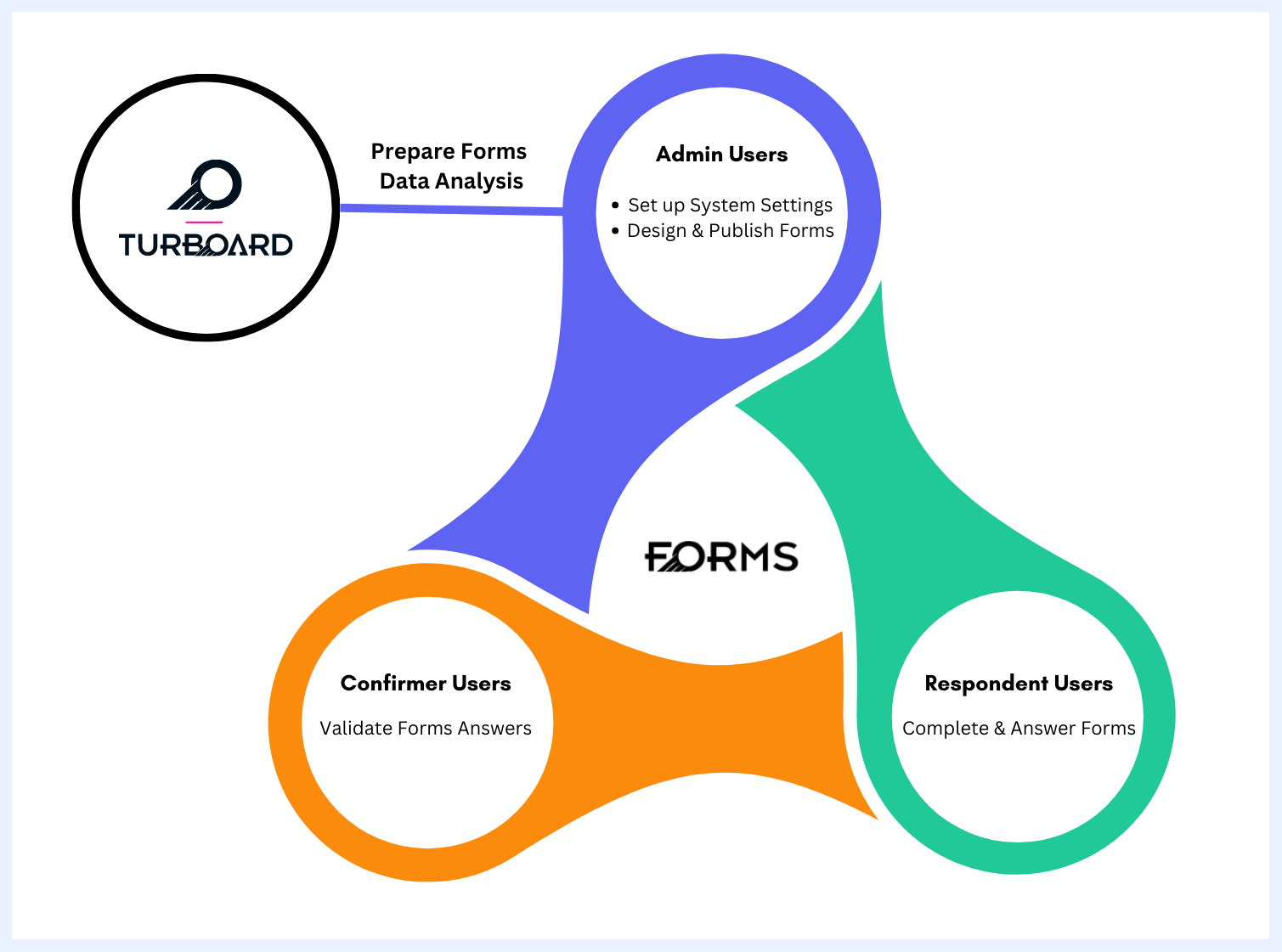
| User | Role | Where | |
|---|---|---|---|
| Admin User | ✔ Set up and manage system settings such as default appearance, logos, users and groups, and notification configurations. | ✅ System “Settings” & Configurations | ⬇ |
| Admin User | ✔ Design and customize forms, including fields’ display and input settings, as well as publish and expiration dates. ✔ Determine submission rules, including allowing multiple submissions and mandating approvals. ✔ Assign confirmer users for forms that require mandatory approvals. ✔ Distribute (publish) forms to respondent users. |
✅ “Create New Form” Tab | ⬇ |
| Respondent User | ✔ Receive notifications for new forms. ✔ Access and complete forms on mobile or computer. ✔ View their past form submissions. |
✅ SMS/E-mail ✅ “Forms” Tab ✅ “Responses” & “Past Responses” Tabs |
⬇ |
| Confirmer User | ✔ Review and validate form responses, with the options to approve, reject, or remove them. | ✅ “Responses” & “Past Response” Tabs | ⬇ |
| Admin User | ✔ Monitor and oversee the entire form response collection. ✔ Integrate form responses into TURBOARD dashboards for analysis. |
✅ “Forms” Tab > Ellipsis Menu > “Edit Form” Option ✅ “Forms” Tab > Ellipsis Menu > “TURBOARD Report” Option |
⬇ TURBOARD Integration: All collected, verified, and approved form responses automatically flow directly into TURBOARD for real-time reporting, visualization, and dashboard analytics.