Form Types
In the evolving landscape of data collection and business intelligence, it's no longer sufficient to just gather data; the structure and granularity of the data have become equally critical. TURBOARD's FOR-S Companion Module stands out in this space, offering distinctive form types that not only collect data but do so with precision and context. These aren't mere forms; they are structured pathways designed to direct information flow in a manner most beneficial to businesses.
One Dimensional Forms
Nature: One dimensional forms are designed for collecting linear data, much like a single row or column. Picture them as lists, where each entry is an individual data point, with no ties to other entries. They provide a straightforward, one-way, and intuitive approach, making them ideal for situations that don't need complex relational data.
Advantage: Their simplicity is their strength. They ensure clarity, reduce respondent errors, and are efficient for rapid data collection. These forms are also highly adaptable, boasting flexibility in data input and accommodating a wide range of field types. This ensures that regardless of your data collection needs, you can design a One Dimensional form tailored perfectly to your requirements. In contexts where data needs to be uncomplicated and straightforward, yet highly customizable, the One Dimensional forms truly shine.
Ideal Use: When capturing linear trends, feedback on specific topics, or list-like entries, these forms provide a clean, streamlined process. Whether it's capturing feedback on various topics, registering event attendees, monitoring basic inventory lists, or enumerating daily tasks, these forms offer a clean and efficient way to gather diverse information from numerous users. Their uncomplicated and flexible design ensures that respondents can swiftly and accurately provide their inputs without the potential confusion that more intricate structures might introduce.
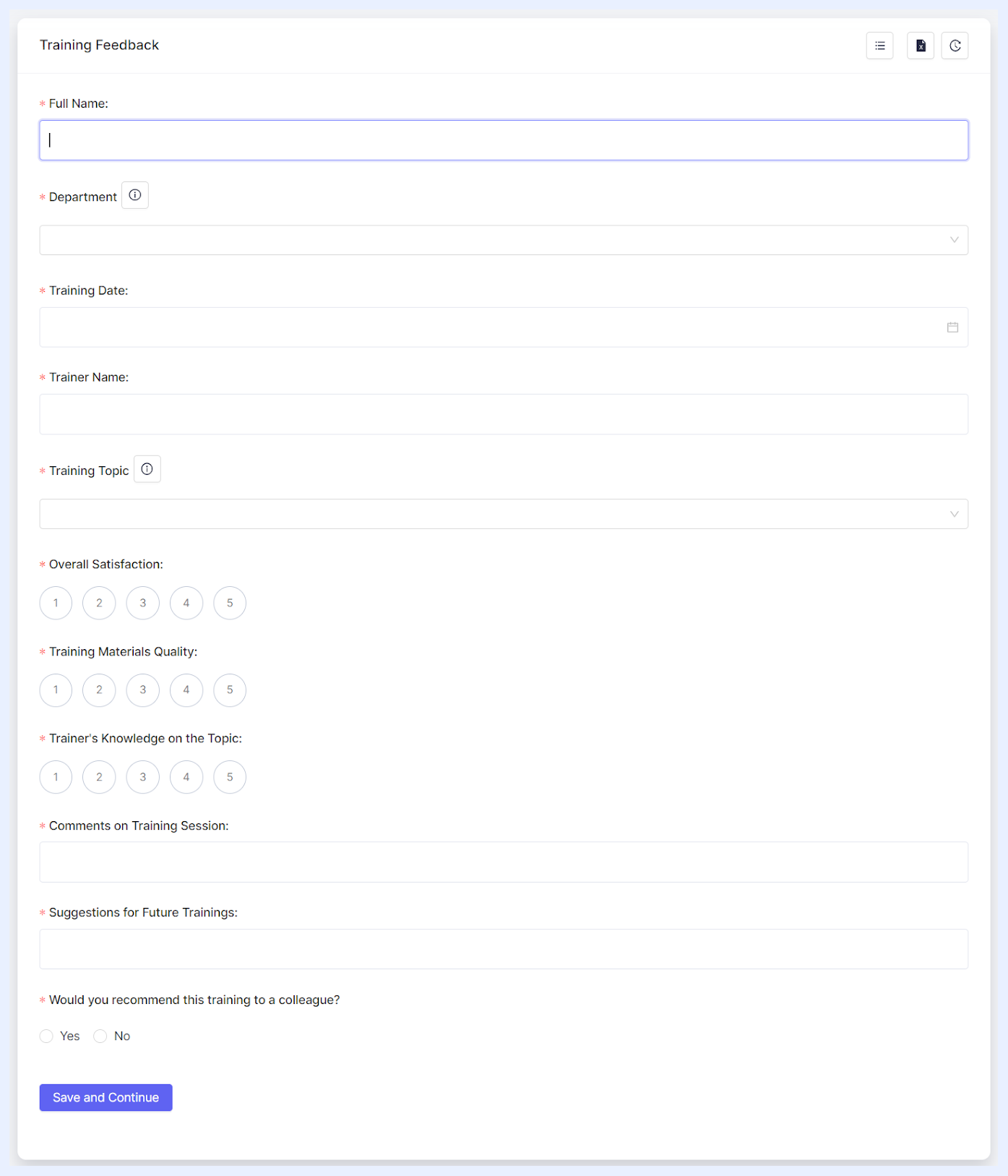 1 Dimensional Form Sample
Two Dimensional Forms
Nature: Imagine a chessboard. Every square on that board has a distinct coordinate made up of its row and column position. Two Dimensional forms operate similarly, making them capable of capturing complex, multi-faceted data. Each entry isn't just a data point but a relationship.
Peculiarity: What sets these forms apart is their ability to establish connections between data points. Instead of a linear capture, they provide a matrix-style structure, enabling the representation of data in two dimensions. This not only captures more intricate data but also offers a spatial context to it.
Advantage: Depth and relation. They facilitate a comprehensive understanding of data by allowing intersections of information as the data is collected in a grid format where data entries in rows represent unique entities or events, while the columns detail attributes related to that row. This is invaluable when analyzing trends, patterns, or correlations in TURBOARD, ensuring that data insights are multi-layered and rich.
Ideal Use: When there's a need to map out interdependent data, like budget allocations across departments over months, or product sales by regions and seasons, the Two Dimensional forms are the go-to choice.
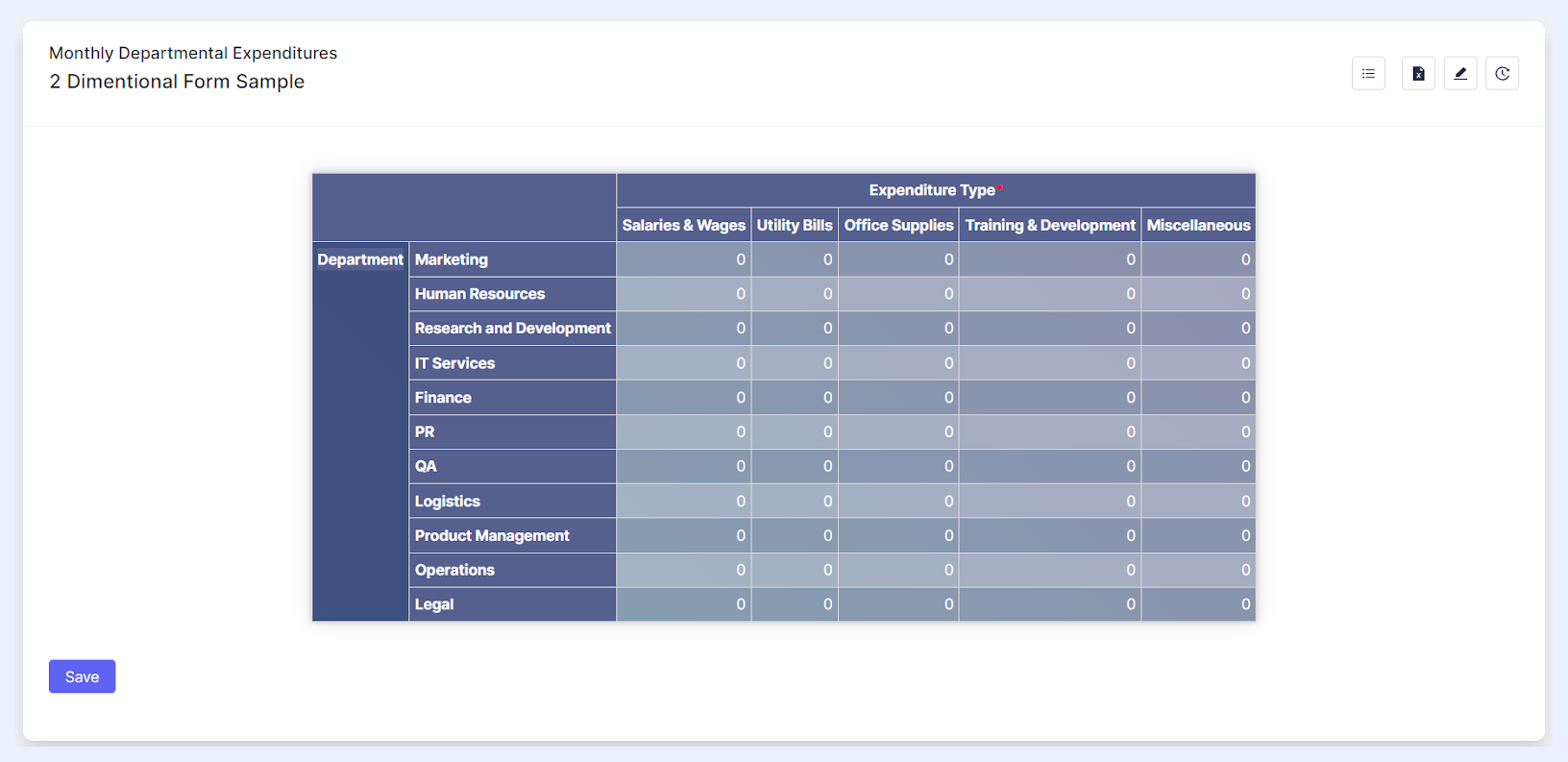 2 Dimensional Form Sample
Differences Between Form Types
To better understand the differences between 1 Dimensional and 2 Dimensional forms, refer to the table below. It breaks down their distinctions, offers practical business use cases, and illustrates how they can be analyzed in TURBOARD Business Intelligence.
| Overview | 1-Dimensional Form | 2-Dimensional Form |
|---|---|---|
| Concept | One-dimensional forms are analogous to a single vector of data. Each piece of data is independent and does not rely on other entries for context. Think of it like a single list or a line of unrelated items. | Two-dimensional forms are more like tables where each row is an entity and columns are attributes or properties of that entity. The intersection of a row and column gives specific information about that entity's attribute. |
| Input Data | Allows for versatile data entry types such as text, numbers, radio buttons, dropdowns, checkboxes, etc. Each entry is typically captured in its own distinct field or space. | Primarily structured for numeric inputs. Each intersection of a row and column expects a number (either an integer or double). Textual descriptions or selections are typically not permitted for respondents within the main grid but can be added as row or column headers by the form designer (the admin user). |
| Use Cases | ➤ Feedback Surveys: Consider a retail store collecting feedback on different aspects such as ambiance, customer service, product variety, etc. Each feedback item is distinct and doesn’t necessarily depend on the other. ➤ Event Check-In: At a conference, attendees might register their presence by ticking off their names. Each tick is independent of the other. |
➤ Inventory Tracking: Consider a warehouse that logs items. Each row represents a product, while columns might detail attributes like quantity, supplier, date received, etc. ➤ Sales Record: In a retail setting, every sale could be a row, with columns detailing the item sold, customer details, sale date, and amount. |
| BI Analysis | ➤ Measures: Given their simplicity, data from one-dimensional forms often becomes a measure in BI tools. Using our feedback survey example, the number of positive responses could be aggregated as a measure. ➤ Dimensions: Data points here might not often be used as a dimension, but can be associated with dimensions present in other data sources (e.g., the “time” of the feedback or “location” of the store). |
➤ Measures: Many of the columns in two-dimensional forms can be aggregated as measures. In our sales record example, the “amount” column can be totaled to give monthly sales figures. ➤ Dimensions: Rows in two-dimensional forms often represent dimensions. Using the inventory example, each “product” would be a dimension. Columns can also represent dimensions, particularly when they detail categorical data (e.g., the “supplier” or “product type”). |